
Adding Employment Records
Tutorial Video: Adding Internal & External Employment Records
To change a client’s Employment Status, an employment record needs to be added to their profile by clicking the +ADD button in their Employment tab.
A modal will appears to prompt users to add an Internal or External record of employment:
Internal Records | |
|---|---|
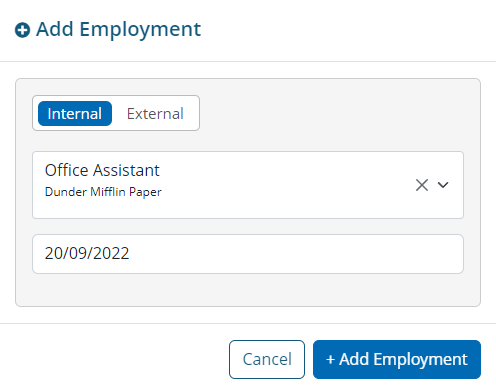
Internal records are jobs created within the AMS Job System, and allows users to select from all active job posts. When a user selects a job from the list and sets the start date:
|  |
External Records | |
|---|---|
External records are jobs not created in the AMS Job System, but still allows users to add an employment record with base job information for the client. For external records:
| 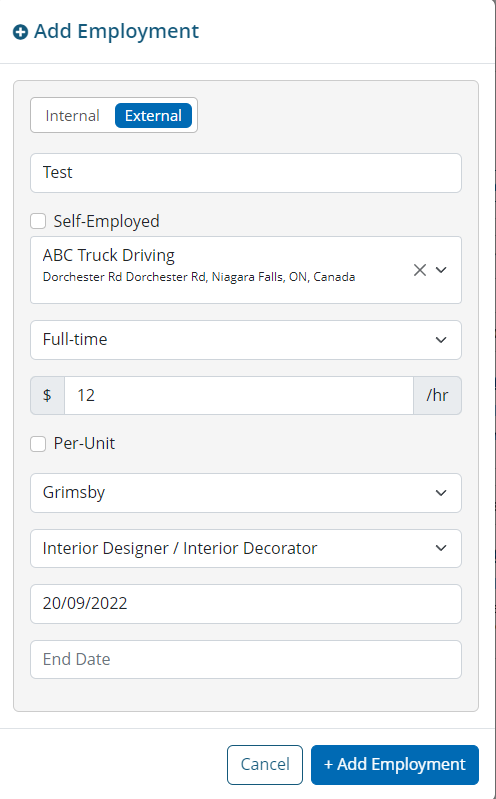 |

External records must be attached to an Employer found in the AMS Job System.
If the employer does not appear in the list, they must be added in the AMS Job System prior to adding an employment record to a client’s profile.
What is the Unknown employment status?
For some clients created in the AMS - either manually or automatically - an UNKNOWN label will be visible on their Employment tab.
This label is used to help identify potentially missing information in the case profile or can act as an action-item for a user to follow-up with the client about their employment status.
In order to change an UNKNOWN employment status label, users can either:
Add an internal or external employment record, or
Click SET AS UNEMPLOYED, which does not add any historic employment records for this client.