
2.2 Advanced Search
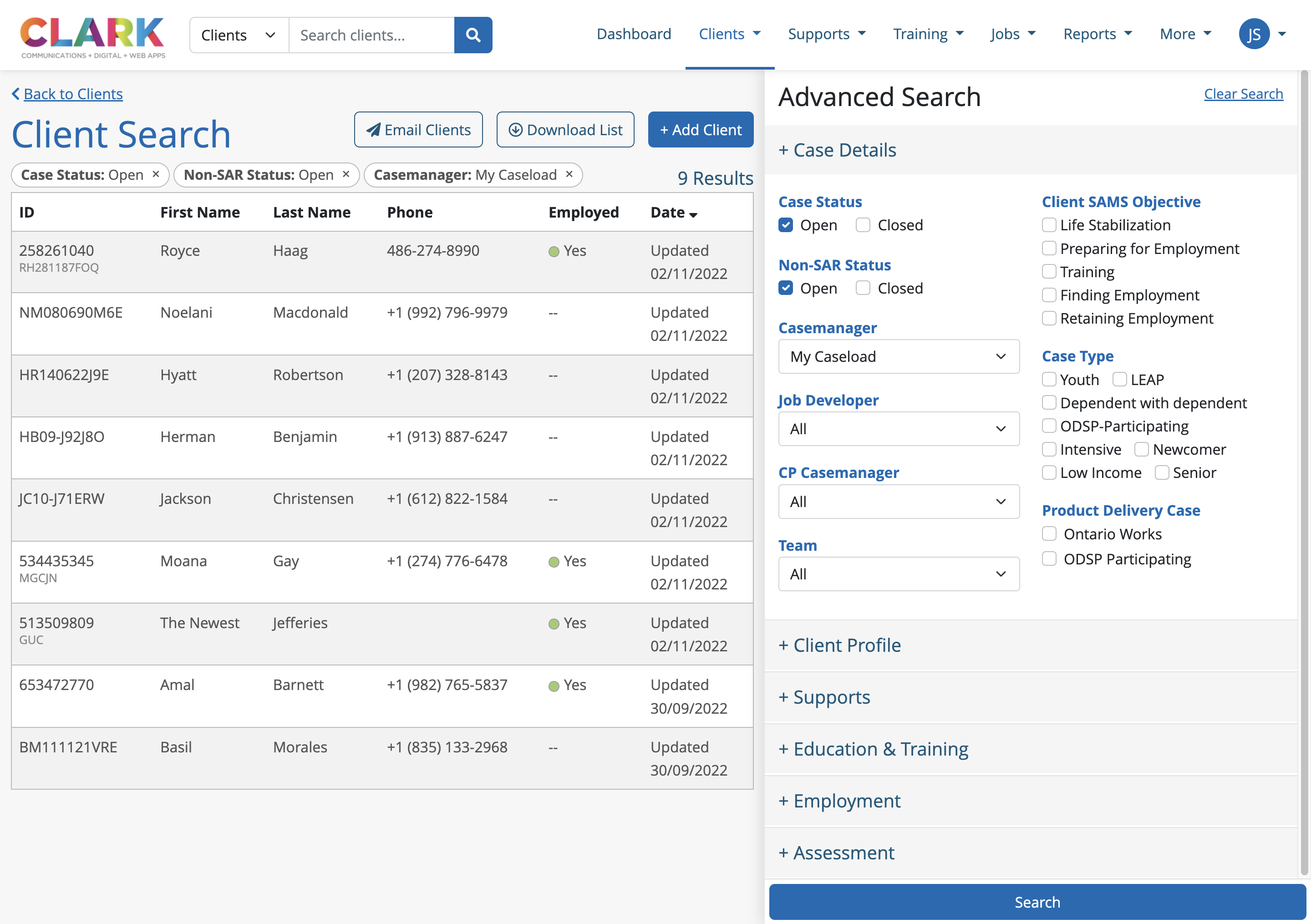
Users can use the Advanced Search feature to perform a specific search in the database for clients that fit the criteria set. This search includes all data points being captured for the client, including case details, demographics, education and training, employment, and assessments.
Additional Features
Based on the criteria set in the Advanced Search, users can perform two actions directly from this list screen to this specific caseload segment:
Email Clients
Send a system-generated email to all clients included in the segment.
Clients are always blind-copied on system-generated emails.
If a client does not have an email address, no email will be sent to them.
System-generated emails are automatically logged in the Communication tab.
Download List
Generates an Excel file based on the Advanced Search results, and includes the data visible on the Client List page, as well as other client details:
Middle name, address, and contact information
Date of birth and gender
Highest education and employment status
SAMS objective and case status

The Excel does not include the Updated Date from the Client List page.